Hanzi Flow 1.0
I learned 3,000 Chinese characters in two weeks thanks to this app. I can read anything now.
The secret? An adaptive algorithm that keeps you in flow state. It picks sentences with 2-5 unknown characters based on your current mastery, across 79,000+ real sentences. Always challenging, never frustrating. No deck management, just type pinyin and practice.
Demo: hanziflow.vercel.app
Source: github.com/brianhliou/hanzi-flow
The Problem with Existing Tools
I’ve struggled with Chinese hanzi my whole life. After building this app Chinese learning apps basically fall into three camps, and they all have drawbacks.
Flashcard apps like Anki make you memorize isolated characters. You spend more time organizing decks than actually learning. When you finally see a character in real text, you can’t recognize it because you learned it divorced from any context.
Dictionary apps like Pleco are great for looking stuff up, but they’re totally passive. You read, you understand, nothing sticks. No active recall, no typing practice.
Reading apps and tutors give you either children’s books (boring) or native content (way too hard). You’re bored or overwhelmed, neither of which builds fluency.
The missing piece is maintaining flow state. That 90-95% comprehension zone where you’re challenged but not frustrated. You need sentences at the right difficulty level, picked automatically, with active recall through typing.
What I Built
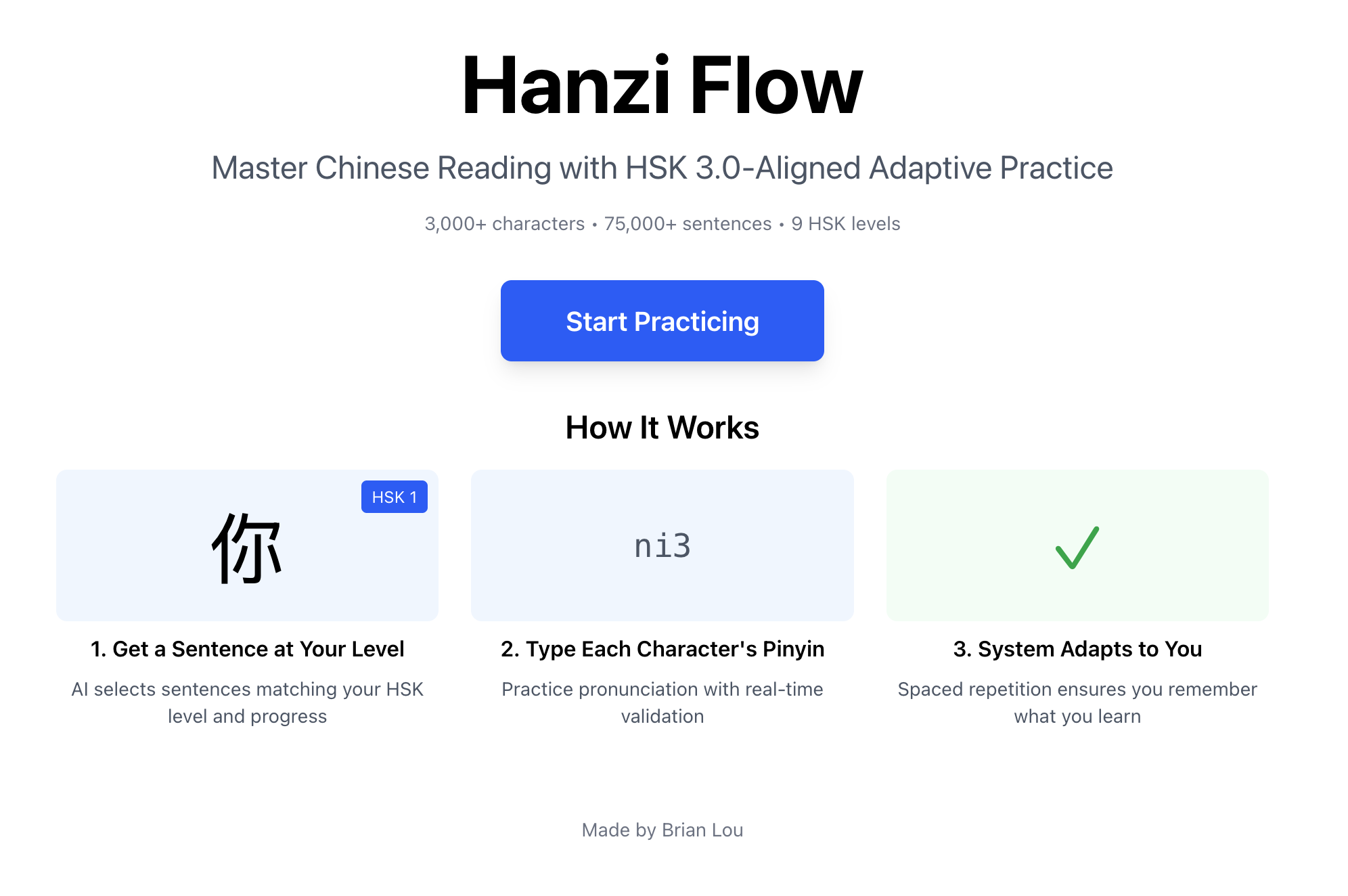
Hanzi Flow is sentence-based practice with adaptive difficulty. You read Chinese, type the pinyin, and the app picks your next sentence based on how well you know each character. Think Anki meets Duolingo, but smarter and way less manual.
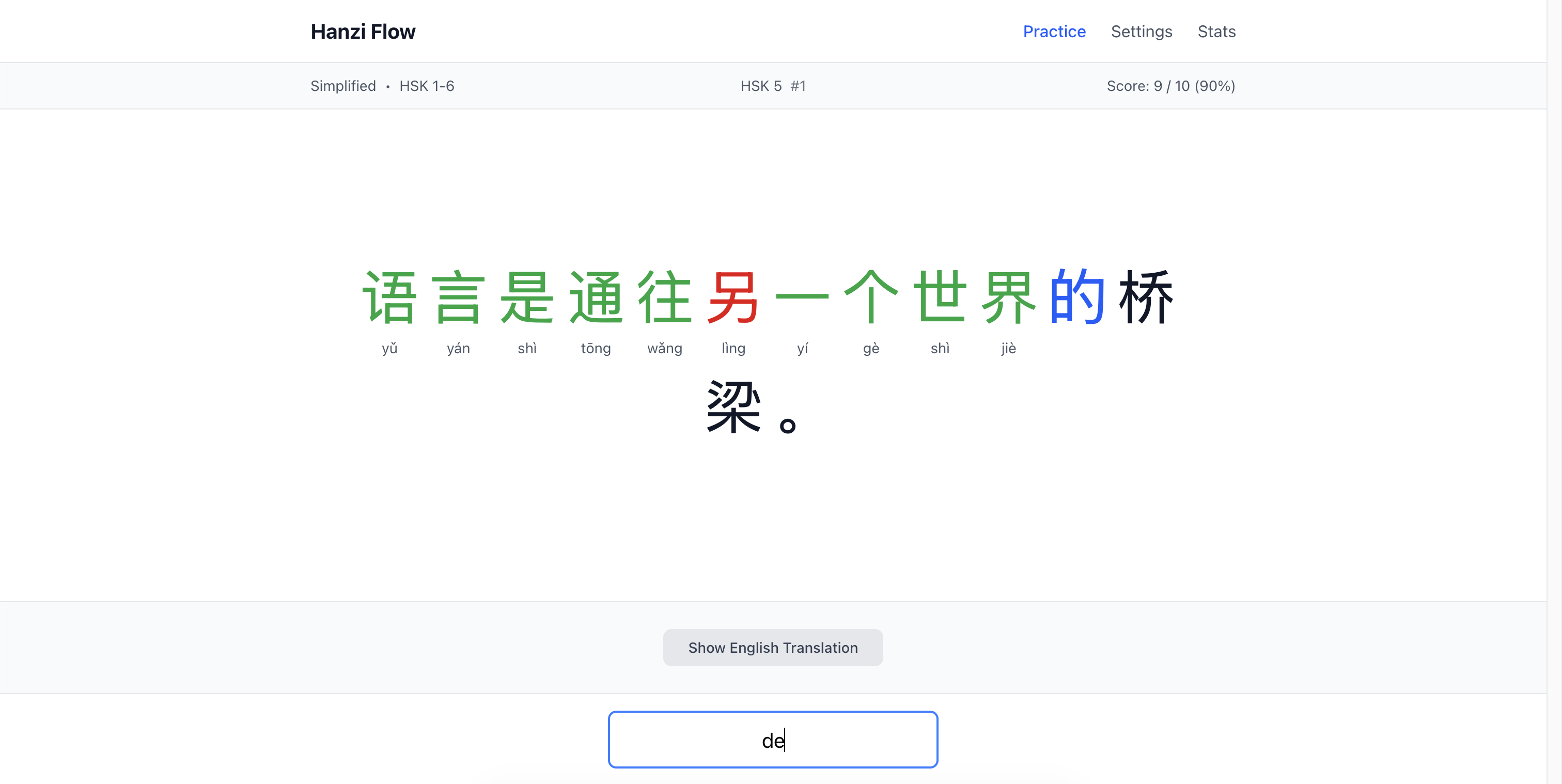
The app:
- 79,000+ sentences from Tatoeba (real usage, not textbook examples)
- 4,000+ characters - HSK 1-9 plus ~1,000 beyond-HSK characters
- Adaptive algorithm - picks sentences with 2-5 unknown characters based on your mastery
- Mastery tracking - character-level scores with spaced repetition (EWMA + SRS)
- HSK 3.0 aligned - filter by official curriculum levels (1-9 or Beyond)
- Script support - simplified, traditional, or mixed
- Real-time feedback - colored visual cues plus 1,598 audio files (all pinyin syllables)
- 100% local-first - no accounts, no tracking, works offline
You practice authentic sentences at your level, build typing fluency with pinyin input, and the system adapts as you improve. No manual deck management.
The User Experience
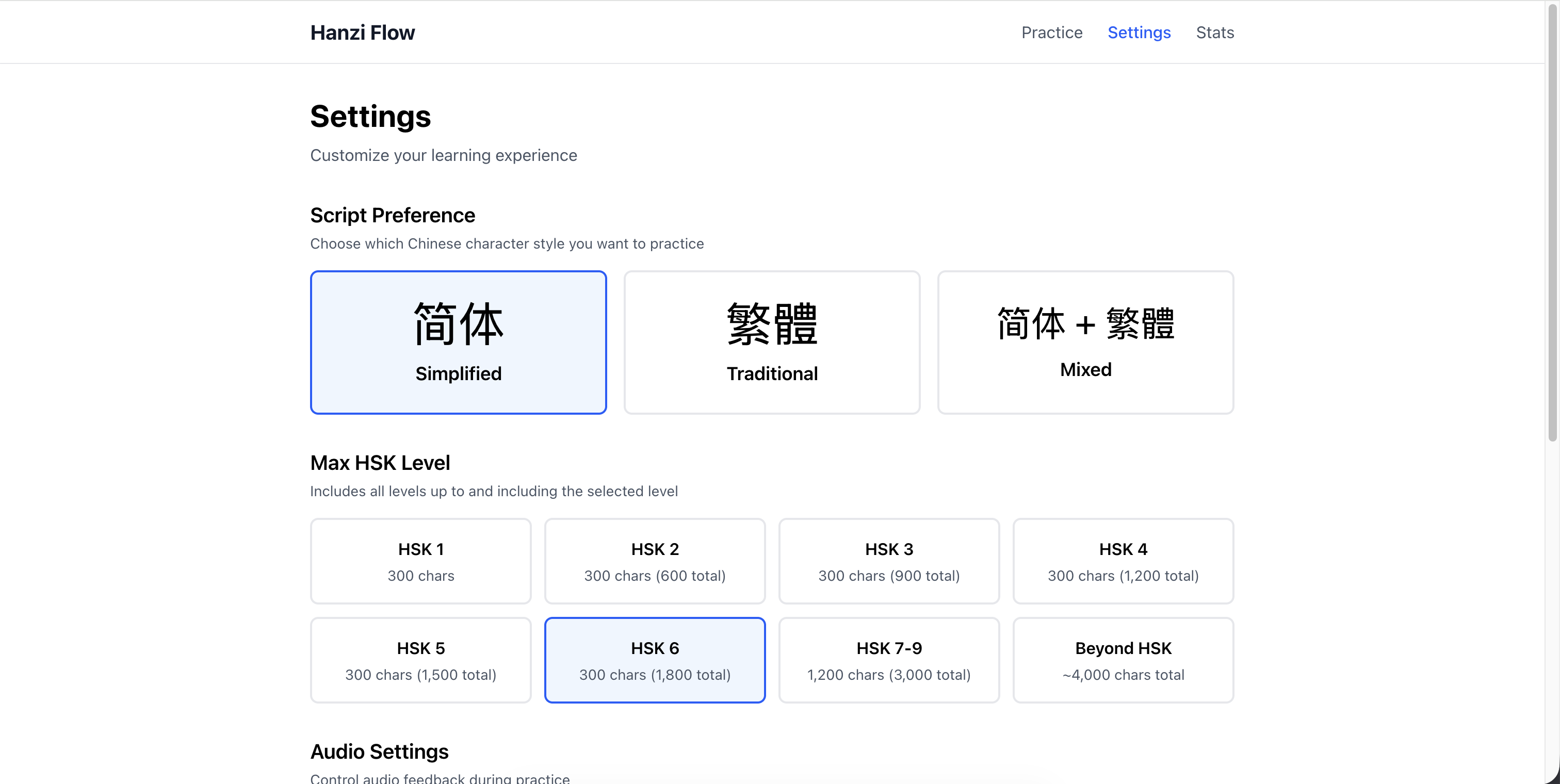
First Run: Setting Preferences
When you first open the app, you pick two things:
Script type: Simplified, Traditional, or Mixed. This filters the corpus to match your goals.
HSK level: The filtering is cumulative. Pick “HSK 1-3” and you get sentences using only level 1, 2, and 3 characters. Pick “Beyond HSK” to include the ~1,000 advanced characters outside the official curriculum.
You can change these anytime in settings. When you do, the app dumps the current sentence queue and regenerates based on your new filters.
The Practice Loop
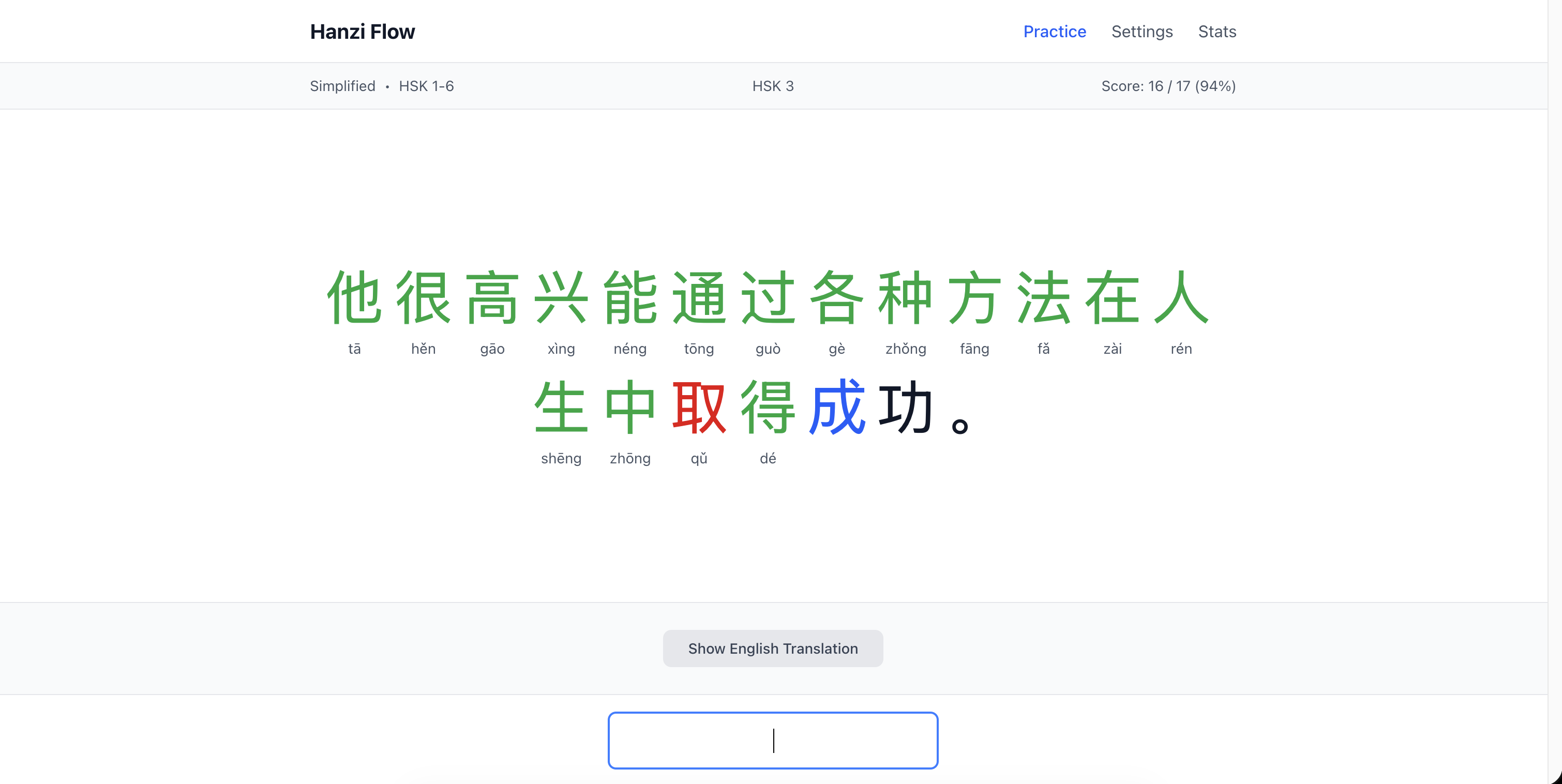
Practice is straightforward:
- Read the sentence - characters displayed large
- Type the pinyin - character by character, tones optional (
wo3orwoboth work) - Get feedback - current char highlighted blue, wrong = red flash + retry (up to 4 attempts)
- See the pinyin - correct answer with tone shows below each character
- Reveal translation - optional English at the bottom when done
- Next sentence - hit Space or click the button
Feedback is instant and visual. You’re always focused on the current character (blue highlight). Wrong answers flash red and play audio of the correct pronunciation. You get 4 tries before the system moves on and marks that character purple (gave up). The system accepts variant pronunciations (地 accepts both de and di), though it shows you the contextually correct one.
Why this works: The rapid feedback loop is the secret. You fail fast, learn fast, repeat. In real life, you might see a character in a book, guess wrong, never find out. Or watch TV and miss pronunciation entirely. Those learning cycles are slow. Casual learners might take months to get enough exposure to learn a single character properly.
This app runs those cycles on steroids. You see a character, type it, get instant correction with audio, retry immediately, move on. Ten seconds, you’ve completed the loop. Do 100 characters in a session and you’ve run 100 learning cycles. That’s more feedback than you’d get in weeks of passive exposure. The combination of active recall (typing), immediate correction (audio + visual), and high volume (sentences keep coming) creates a learning velocity you can’t get from traditional methods.
Progress Tracking
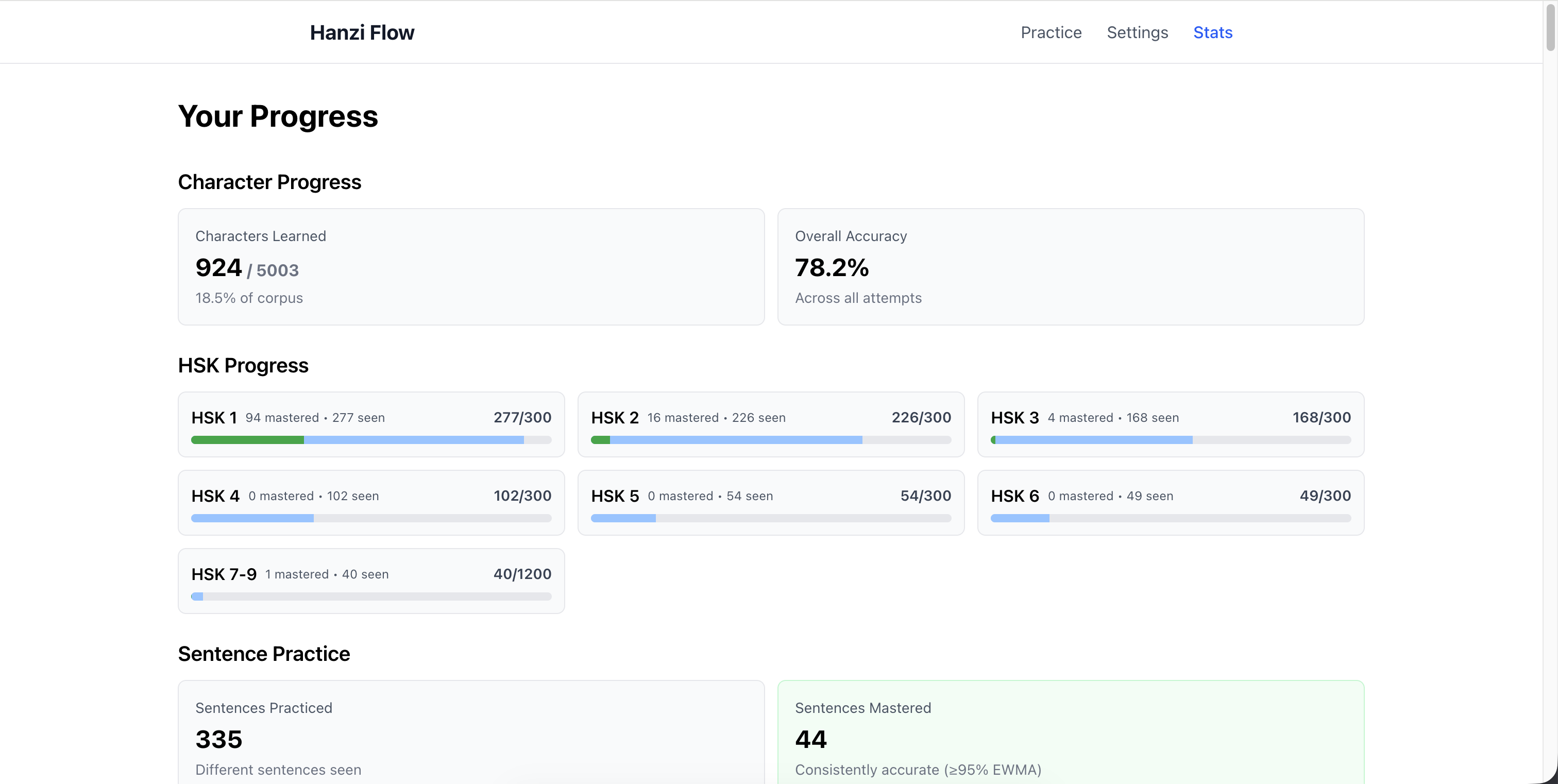
The stats page shows four main metrics:
- Total characters practiced - unique characters you’ve seen
- Characters mastered - where mastery ≥ 0.8
- Sentences practiced - unique sentences completed
- Overall accuracy - percent correct on first attempt
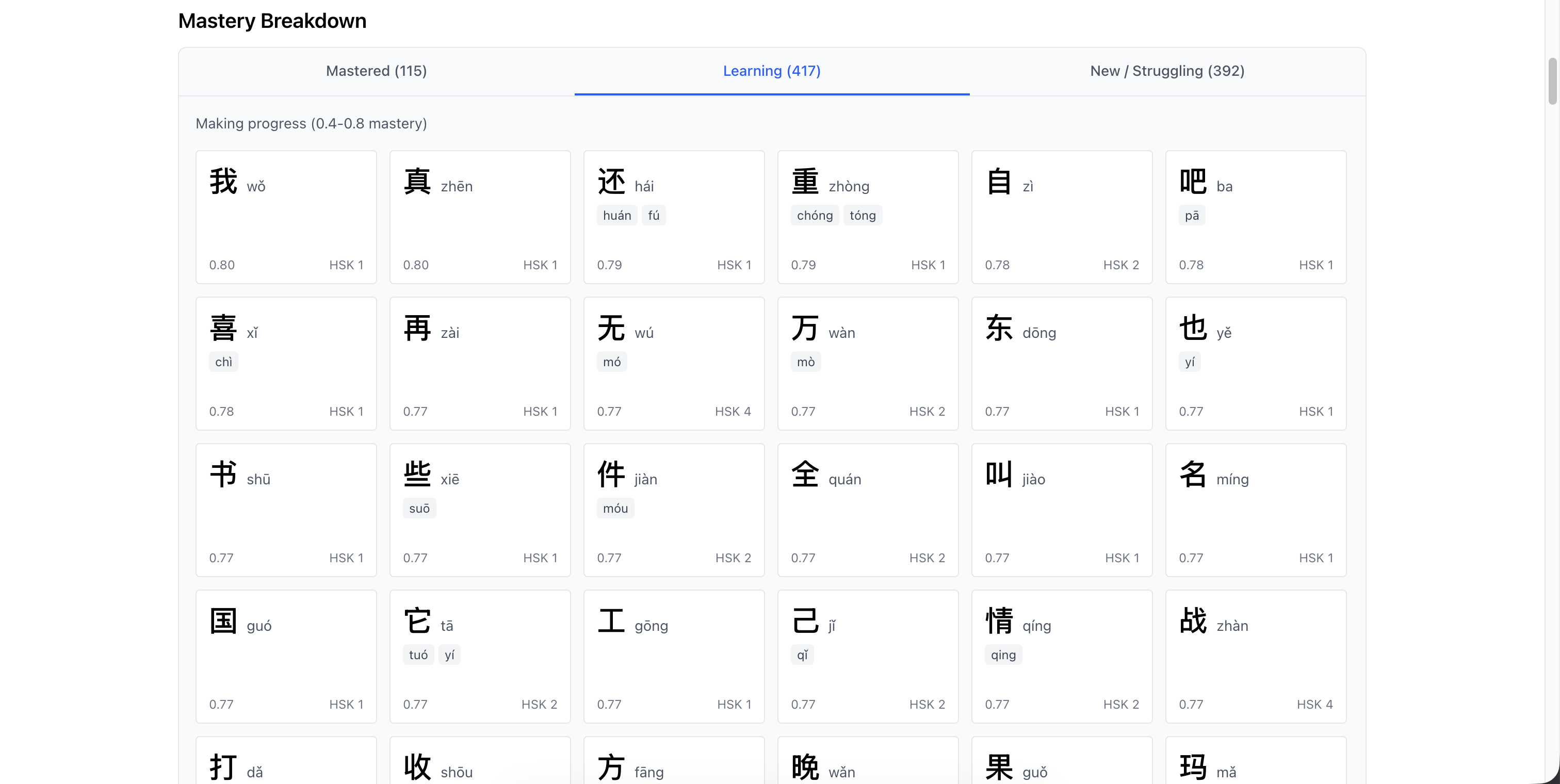
The mastery breakdown groups characters:
- Learning (s < 0.6) - still building familiarity
- Proficient (0.6 ≤ s < 0.8) - getting there
- Mastered (s ≥ 0.8) - solid
Each character tracks when it’s due for review based on spaced repetition.
The Adaptive Algorithm (NSS)
Random selection would suck. You’d see the same sentences too often, waste time on stuff you’ve mastered, or get crushed by sentences with 10+ unknowns.
Next Sentence Selection (NSS) is the algorithm that picks your next sentence. It balances new learning, spaced repetition, novelty, and difficulty.
The Core Idea
Sweet spot: 2-5 unknown characters per sentence.
- 0-1 unknowns - too easy, just review
- 2-5 unknowns - perfect, enough challenge, enough context
- 6+ unknowns - too hard, you’re guessing
The algorithm also balances:
- New learning (characters you’ve never seen)
- Spaced repetition (review due characters)
- Novelty (don’t grind the same sentences)
- Variety (mix difficulty levels)
How It Works
NSS runs in batches. When you start practicing, it generates 10 sentences. When you’ve done 8, it prefetches the next batch in the background. You never wait.
Four steps:
1. Filter eligible sentences
Start with full corpus (79K). Apply your filters:
- Script (simplified/traditional/mixed)
- HSK level (your selected range)
- Cooldown (exclude sentences seen in last 20 minutes)
This gives the eligible pool, typically 20K-40K sentences.
2. Sample 300 random candidates
Randomly grab 300 from the pool. Large enough for variety, small enough to score fast (under 100ms). Random sampling ensures you see different sentences each session.
3. Score each candidate
For each of the 300, calculate a score from four factors:
- Base gain - sum of (1 - mastery) for each character. Higher for low-mastery chars. If overdue for review, gain doubles.
- Novelty - bonus based on time since last seen. Encourages variety, prevents grinding.
- Pass penalty - if you’ve aced this sentence multiple times, reduce score. Avoid over-practicing.
- k-penalty - penalize sentences outside the 2-5 unknown band. Enforces difficulty.
Add them up: score = base_gain + novelty - pass_penalty - k_penalty
4. Select top 10, shuffle, queue
Sort by score, take top 10, shuffle to mix difficulty. Add to queue.
You practice these 10. When 2 remain, algorithm runs again in background to prefetch next batch.
Mastery Tracking
Every character gets a mastery score (s) from 0.0 to 1.0.
- s = 0.3 (default for new chars)
- s → 1.0 (getting it consistently)
- s → 0.0 (getting it wrong)
Updates use Exponentially Weighted Moving Average (EWMA) with α=0.15. Recent performance matters more, but changes are gradual. One mistake won’t tank you, one success won’t inflate.
When you get a character right, its stability (SRS interval) grows by 1.2x. Starts at 1 hour. Then 1.2 hours. Then 1.44 hours. Keeps characters in rotation longer than Anki’s aggressive jumps (1 day → 3 days → 7 days).
Why slower? Same-day review matters. You need to see a character 3-5 times in one session to move it from short-term to long-term memory. Fast jumps miss that window.
When a character is due (past its next_review_ts), it gets double weight in scoring. Algorithm prioritizes sentences with overdue characters. Classic spaced repetition.
The Data Pipeline
Building this required comprehensive data: characters with pronunciations, sentences with translations, difficulty tags, quality filters. Here’s how I built the corpus.
Character Set
Started with Unicode CJK Unified Ideographs (U+4E00 to U+9FFF) - that’s 20,992 characters. Every character in modern Chinese plus rare variants and historical forms.
Then enriched each one with data from three sources:
- Unihan database - pinyin readings, variants, radical decomposition
- CC-CEDICT - English definitions and example words (学 → “study; learn”, 学生 → “student”)
- OpenCC - simplified/traditional mappings for script classification
Result: 99.7% of characters have pinyin, 67% have English glosses, 35% have variant mappings. I know which characters actually appear in Tatoeba (5,000+) vs which are theoretical (rare classical stuff).
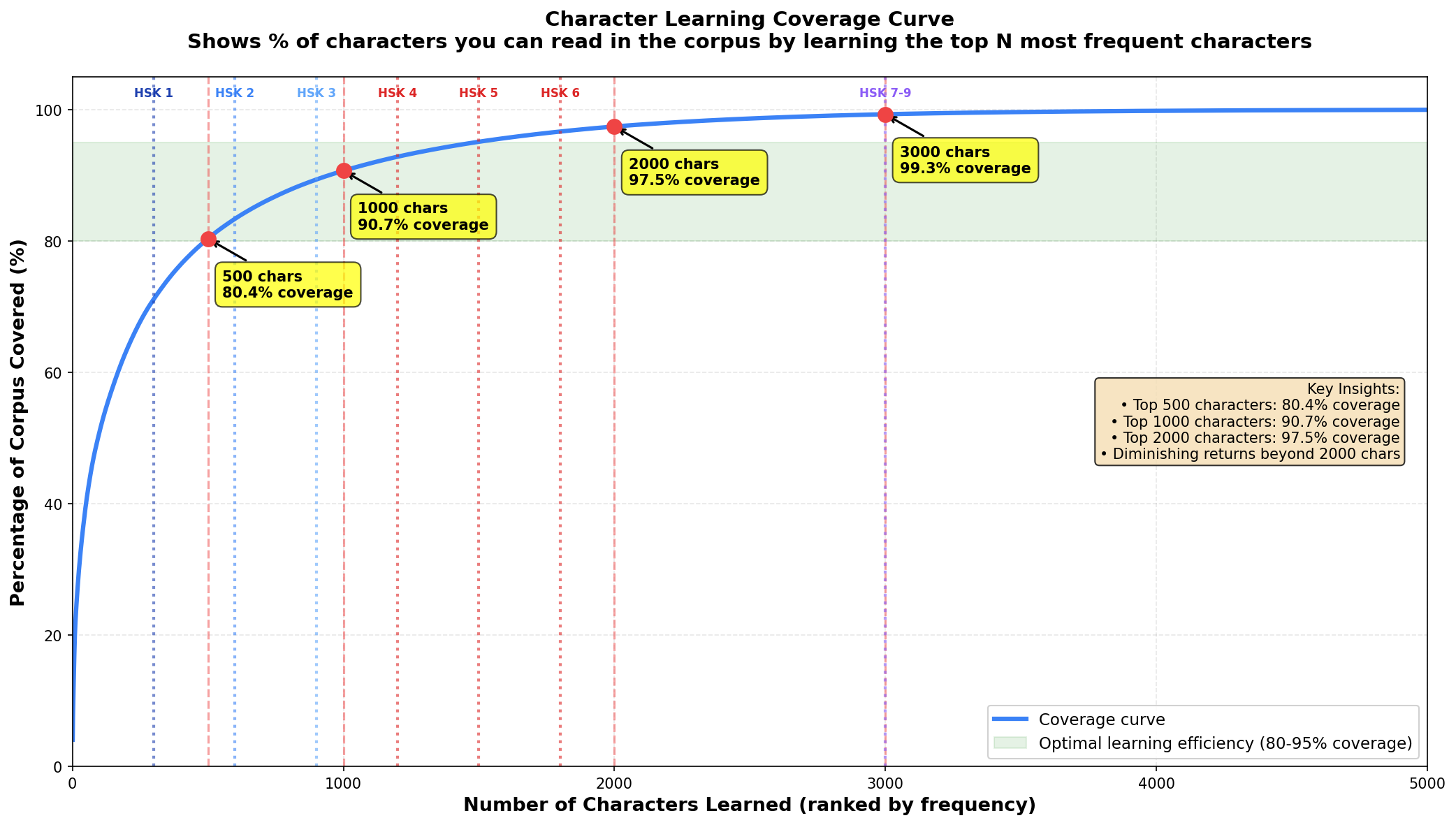
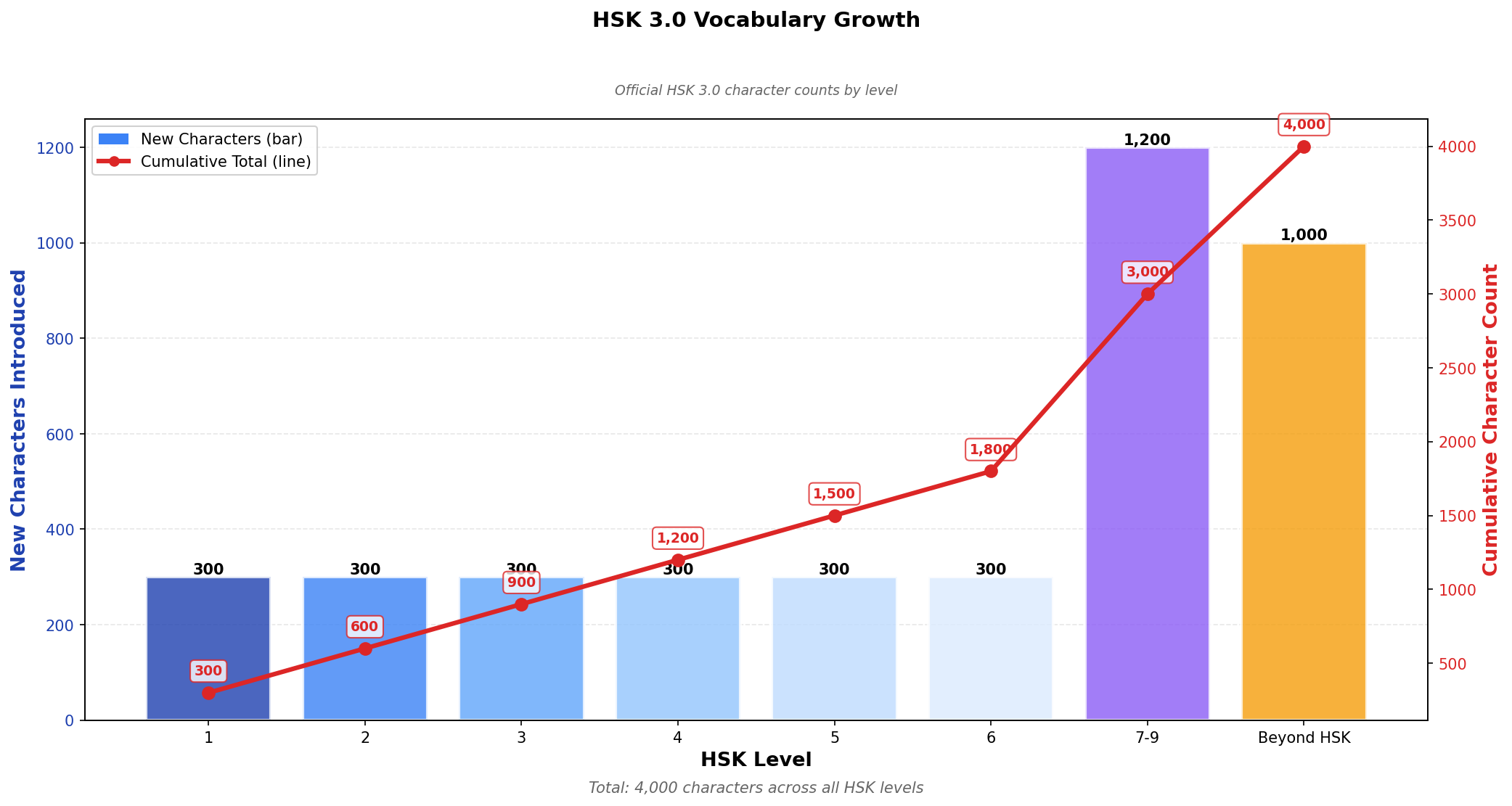
The curve shows how characters accumulate across HSK levels. HSK 1 has ~300 chars, HSK 2 adds another 300, etc. The curve flattens at higher levels as you approach the ~3,000 char literacy threshold. Beyond that, diminishing returns.
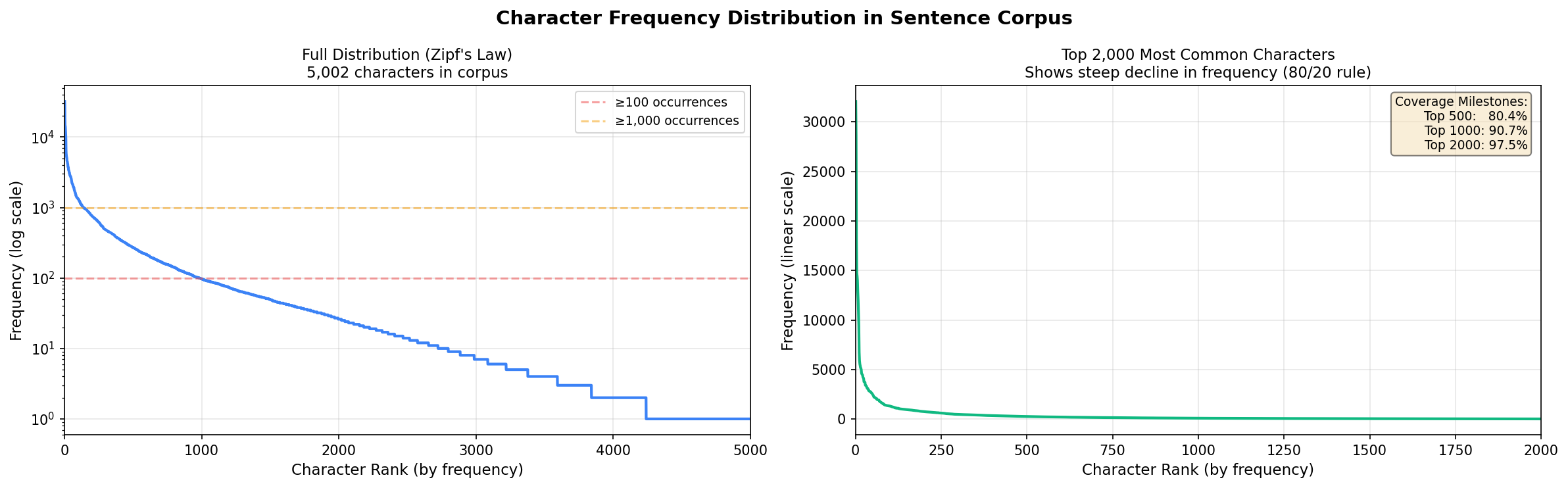
Frequency distribution follows Zipf’s law - a handful of characters dominate, most are rare. Top 500 characters cover 75% of text. Top 2,000 cover 95%. This matters for the adaptive algorithm because learning high-frequency stuff first gives immediate reading ability.
HSK Classification
HSK (Hanyu Shuiping Kaoshi) is China’s official proficiency test. The 2021 revision (HSK 3.0) defines 9 levels and 3,000 characters total. I integrated the official lists from elkmovie/hsk30 (OCR’d from the government PDF).
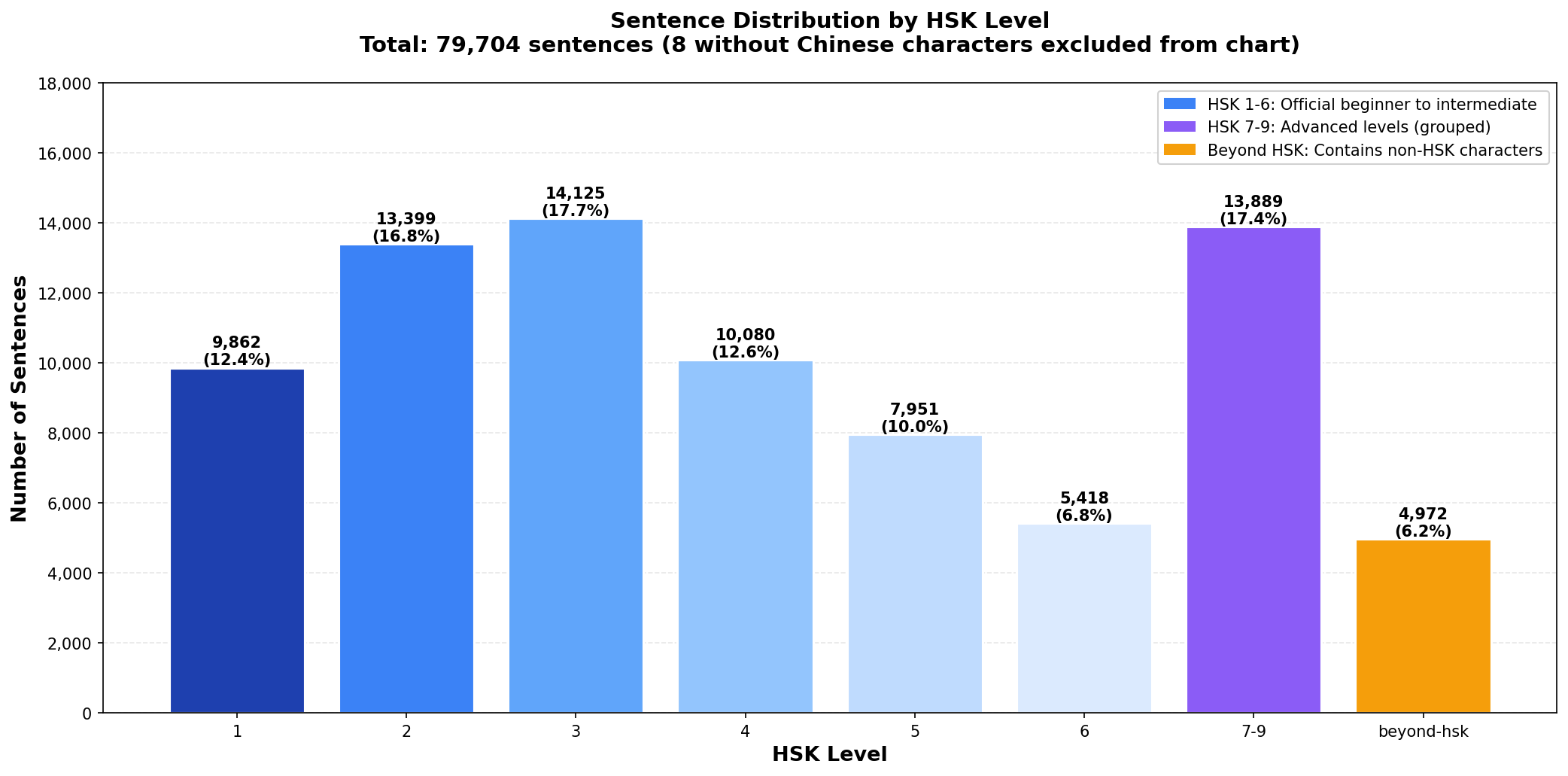
Each sentence gets classified by its hardest character:
- All HSK 1 chars? Tagged “1”
- Hardest char is HSK 3? Tagged “3”
- Has chars beyond HSK 9? Tagged “beyond-hsk”
This drives the filter. When you pick “HSK 3”, you only see sentences where every character is from levels 1-3. No surprises.
Sentence Processing
Pulled 79,000+ Chinese sentences from Tatoeba, a crowdsourced translation database. Each has English on one side, Chinese on the other.
The challenge: Context-aware pinyin. Chinese characters have multiple pronunciations depending on context. Used jieba + pypinyin for initial pass, then validated with GPT-4o-mini (~$2 for 79K sentences). Fixed 10,336 errors across common polyphonic characters like 地 (de vs di4), 著 (zhe vs zhu4), and 谁 (shei2 vs shui2).
Examples of polyphonic characters:
- 了:
le(particle) vsliao3(to finish) - 行:
xing2(okay) vshang2(row/line) - 长:
zhang3(to grow) vschang2(long)
You can’t just look it up in a table. You need to understand the word context.
Step 1: jieba + pypinyin. Jieba segments “我们试试看” into [“我们”, “试试”, “看”], then pypinyin generates pinyin for each word: 我们试试看 → wo3 men shi4 shi4 kan4. Works for most cases, but fails on particles and colloquial pronunciations.
Step 2: GPT-4o-mini validation. Ran the full corpus through OpenAI’s API (~$2 for 79K sentences, batched 10 per call). Prompted for character-by-character pinyin with tone marks. Found 10,336 errors across 79,603 sentences. Key corrections:
- 覺 (120 changes): pypinyin gave
jue2(feel), OpenAI gavejiao4(sleep)- 你應該去睡覺了吧 - “You should go to bed”
- 著 (696 changes): pypinyin gave
zhu4(wear), OpenAI gavezhe(particle)- 生活就是當你忙著進行你的計劃時… - “Life is what happens when you’re busy making plans”
- 谁 (404 changes): pypinyin gave
shui2(formal), OpenAI gaveshei2(colloquial)- 你知不知道他们是谁? - “Do you know who they are?”
- 长 (136 changes): pypinyin gave
zhang3(grow), OpenAI gavechang2(long)- 我看见一个长头发的女生 - “I saw a girl with long hair”
Manually reviewed top characters and applied high-confidence fixes. OpenAI’s contextual understanding caught errors that rule-based approaches missed.
English translations: Also generated with GPT-4o-mini (~$1 total). Tatoeba’s dataset only had translations for ~2,000 sentences. Using those would have cut the corpus from 79,000+ down to 2,000, killing the adaptive algorithm’s effectiveness. So I used GPT-4o-mini to translate all 79,000+ sentences. LLMs are excellent at translation because they use context, which is exactly what you need for accurate Chinese-to-English conversion. Examples:
- 我們試試看! → Let’s give it a try!
- 你在干什麼啊? → What are you doing?
- 今天是6月18号,也是Muiriel的生日! → Today is June 18th, and it’s Muiriel’s birthday!
- 生日快乐,Muiriel! → Happy birthday, Muiriel!
- 密码是”Muiriel”。 → The password is “Muiriel.”
Also applied quality filters:
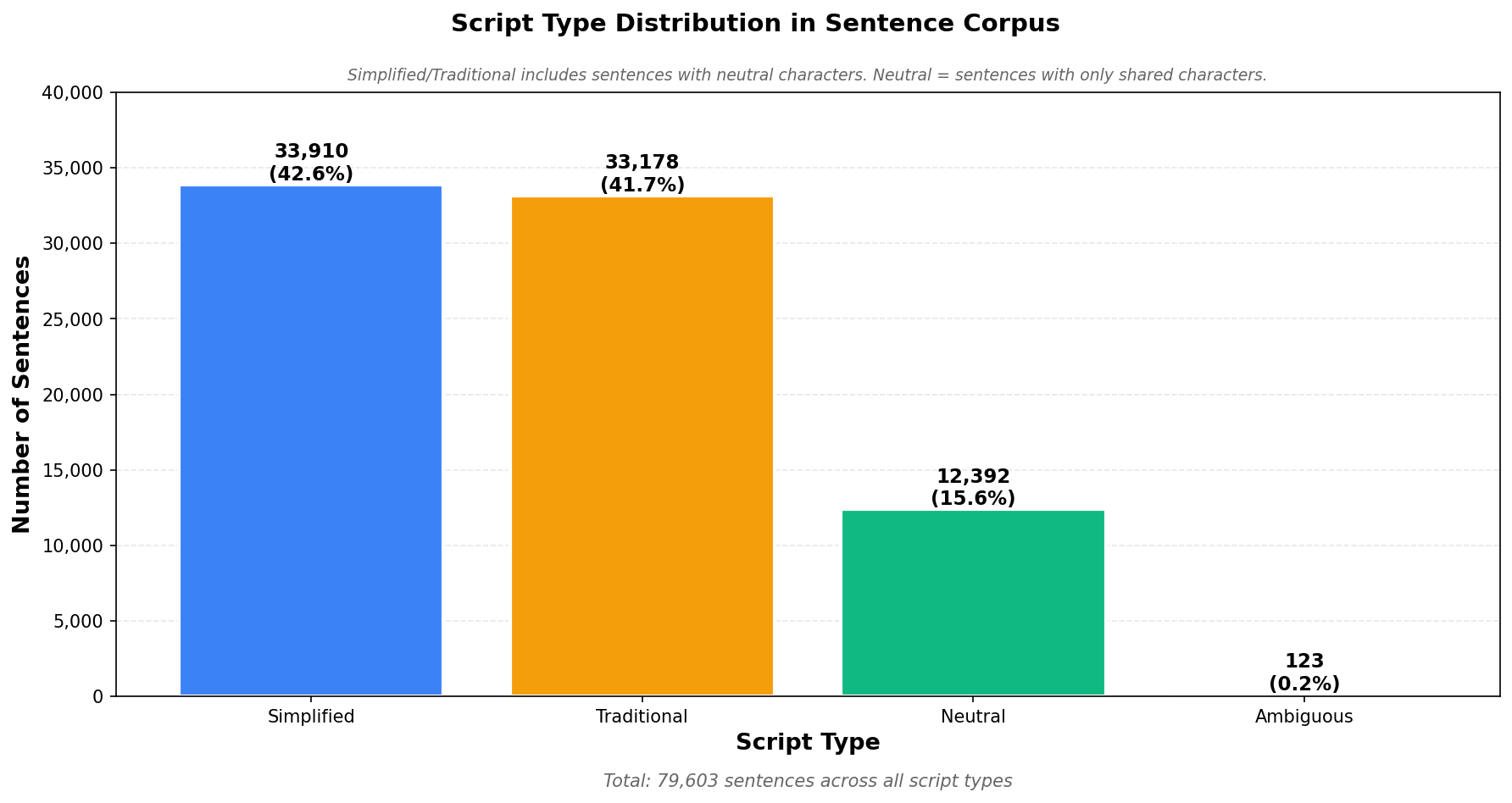
- Script classification - simplified, traditional, neutral, or mixed
- Profanity removal - filtered vulgar terms (~10 sentences)
- Length cap - removed sentences over 50 characters (~270 sentences) to prevent scrolling
- Meta-sentences - removed Tatoeba self-references (~80 sentences)
Final corpus: 79,333 clean sentences.
Architecture & Performance
Built with modern web tech, optimized for speed and privacy.
Why Local-First?
- Privacy - No accounts, no tracking, no telemetry. Your progress never leaves your device. I don’t even have analytics. You own your data.
- Performance - No network latency. Sentence selection runs in <100ms. Typing feedback is instant. Stats load in <50ms.
- Simplicity - No backend to maintain, no database to scale, no auth. The app is static files + client JS. I host on Vercel for free.
- The trade-off: No cross-device sync. Practice on laptop and phone separately. For an MVP, acceptable. Most people have one primary device. Could add export/import or optional cloud sync later.
Tech Stack
Frontend:
- Next.js 15 with App Router
- React 19 + TypeScript
- Tailwind CSS
- Dexie.js for IndexedDB
Data pipeline:
- Python 3.9+ for processing scripts
- jieba for word segmentation
- pypinyin for context-aware pinyin
- pandas + matplotlib for analysis
- GPT-4o-mini for translations and pinyin validation
Audio:
- AWS Polly (Zhiyu voice) for TTS
- 1,598 syllables, all tones covered
- OGG format for browser compatibility
Deployment:
- Vercel (zero-config)
- Static site, no server
- Global CDN
Data Loading & Caching
App loads big datasets on first visit, then caches aggressively.
Initial load:
- 79,333 sentences (~41MB JSON) - fetched once, stored in memory
- Character mapping CSV (~2MB) - IDs, pinyins, glosses
- Audio files - fetched on-demand (1-2KB each)
In-memory caching:
- Sentences in a JavaScript array
- Character-to-ID mapping in a Map (O(1) lookup)
- No re-fetching during session
IndexedDB persistence:
- WordMastery table - one row per character practiced (mastery score, SRS interval, next review time, counts)
- SentenceProgress table - one row per sentence completed (pass rate, attempts, last seen)
- SentenceQueue table - stores next 10 sentences (regenerated when you change preferences)
All data stays on your device. No network calls except initial load.
Performance tricks:
- Audio preloading - when NSS picks next sentence, preloads its pinyin audio in background (3-5 files, <10KB). By the time you see it, audio is cached.
- Queue prefetching - when you finish 8 of 10 sentences, NSS runs in background for next batch. You never wait.
- Lazy loading - stats page only calculates distributions when you visit, not on every action.
Offline: After first load, works completely offline. Practice on a plane, subway, anywhere. Progress saves to IndexedDB immediately (no save button needed).
Key Design Decisions
Tone Numbers vs. Tone Marks
App accepts tone numbers (wo3, shi4) instead of marks (wǒ, shì). Why?
- Easier to type (no special keyboard)
- Standard for Chinese IME (prepares you for real typing)
- Unambiguous (
vandüare equivalent, tone marks need Unicode combining) - Forces explicit tone thinking (
wo3= third tone) vs visual memorization
Sentence-Based Learning
Why sentences vs isolated words?
- Context - Learn characters in real usage. “我们试试看” teaches 我们 (we), 试试 (try), 看 (look) and the grammar pattern.
- Reading practice - Mimics actual reading. Builds the skill of parsing character sequences.
- Typing fluency - Trains muscle memory for full sentences, like you’ll actually use.
- Difficulty calibration - Sentences have natural difficulty distribution (unknown char count). Can’t get this with word-level.
- Motivation - Completing a sentence feels like progress. You’re reading real Chinese, not grinding “的 的 的” flashcards.
What’s Next
The app is feature-complete for daily practice. Potential additions if I come back to this:
- Mobile PWA (make it installable)
- HSK stats breakdown
- Review mode (SRS-focused sessions)
- Sentence audio (full pronunciation, not just character-level)
- Character cards (etymology, stroke order, compounds)
- Tone analytics (track which tones you confuse)
- Custom corpora (import your own sentences)
- Export/import (cross-device portability)
Open source project. Have ideas? Open an issue or PR.
Closing
Built this to scratch my own itch. I wanted to practice reading Chinese without flashcard overhead. Real sentences, adaptive difficulty, clean typing interface.
Turned into a deep dive on data pipelines (79K+ sentences with context-aware pinyin), adaptive algorithms (EWMA + SRS), and local-first architecture (IndexedDB + caching). Learned a lot about polyphonic characters, Zipf’s law, and tuning spaced repetition for same-day review.
If you’re learning Chinese, try it. If you’re a developer, check the repo. There’s interesting stuff in the sentence selection algorithm, data processing, and local-first approach.
Thanks to: Tatoeba for sentences, MDBG for CC-CEDICT, elkmovie for HSK 3.0 lists, Unicode Consortium for Unihan.
Local-first, privacy-first, learning-first.
Try It Yourself
Visit hanziflow.vercel.app to start.
- Pick your script and HSK level
- Type pinyin with tone numbers (
wo3,ni3,ta1) - Check stats page for progress
- Practice daily, watch mastery climb
Source on GitHub under MIT license. Clone and run locally:
git clone https://github.com/brianhliou/hanzi-flow.git
cd hanzi-flow/app
npm install
npm run dev
Open http://localhost:3000.